
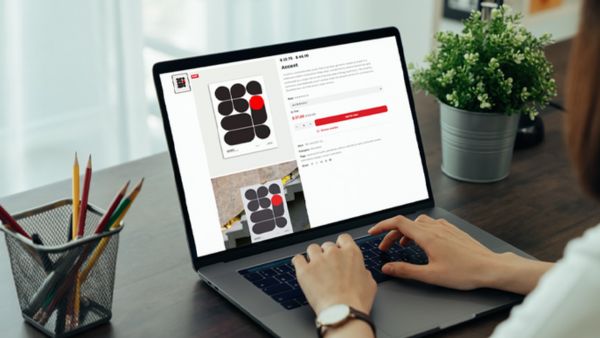
Ordering beautiful wall art from The Blud Studio is easy and fun. First, browse our gallery of digital art prints: we have dozens of categories (Wildlife, Landscapes, Urban Scenes, Minimalist, Typography & Quotes, Classic Art, Science & Space, Japanese Culture, Photography, and more) so you can find the perfect piece for your space. Once you spot a print you like, click it to open the product page.
There you can choose the print size (we offer standard sizes from small 8×10″ up to large 24×36″ and even A1 – all common formats for home or office art) and add an optional frame.
Frames come in Black, White, or natural Red Oak wood – a classic choice that many designers love (“solid, FSC-certified oak wood frames are the perfect pairing for posters”). You can also select how many copies of that print you want.
1. Browse Our Print Categories
Whether you’re decorating a living room, office, or dorm, start by exploring the art categories on the site. We make it easy with clear sections. For example:
- Birds & Animals: Vibrant wildlife and pet prints for nature lovers.
- Scenery: Serene landscapes, mountains, beaches, and more.
- Urban & Architecture: Cityscapes and architectural photography.
- Minimalist: Clean, modern abstract art and designs.
- Typography & Quotes: Inspiring word art and calligraphy.
- Classic Painting–Inspired: Prints inspired by famous artwork and vintage styles.
- Science & Space: Astronomy scenes, science illustrations, and cosmic art.
- Japanese Art & Culture: Prints featuring Japanese-style designs and motifs.
- Photography: Artistic photographic prints of various subjects.
You can click any category to filter the gallery. Each print thumbnail shows a preview – click it to view more details.
2. Select Your Print and Options
On the product page, customize your chosen print:
- Size: Pick from our available dimensions (8×10, 12×16, 18×24, 20×30, 24×36, A2, or A1). These cover typical art-print sizes for walls. Smaller prints are great for desks or shelves; larger ones make a bold centerpiece on a wall.
- Frame (optional): If you’d like a framed poster, choose Black, White, or Red Oak. You can also leave it unframed if you prefer a poster-only look.
- Quantity: Enter how many prints of this design you want.
After selecting size, frame, and quantity, click “Add to Cart.”
3. Add to Cart and Apply Your Coupon
Next, click the Cart icon (usually at the top-right) to review your selections. In the shopping cart, you’ll see each print listed with its chosen size, frame, and quantity. This is your chance to double-check everything.
- Review Items: Confirm the details (art title, size, frame, quantity). You can remove or edit any item here if needed.
- First-Time Discount: If this is your first purchase, be sure to enter coupon code TBS01 during checkout. This saves you 15% on your order. (We make this easy for you: according to UX research, having an easy-to-apply promo code greatly improves the checkout experience. And offering a first-time discount is a proven way to encourage new customers to try a store.) After entering TBS01, click “Apply,” and you’ll see the discount reflected immediately in the total.
- Proceed to Checkout: When everything looks good, click “Checkout” to continue.
4. Checkout & Payment
On the checkout page, enter your billing and shipping details. Be sure to include a valid address so we can deliver your prints.
- Enter Information: Fill out your name, address, email, and any other required fields. We only use this to process and ship your order.
- Payment Method: Choose PayPal or Credit/Debit Card. (You can pay directly with PayPal, or select the credit/debit card option through PayPal without needing a PayPal account.) PayPal is a globally trusted payment system – for example, one study found 44% of consumers trust PayPal to safely handle payment credentials. So you can feel confident your transaction is secure.
- Review Order: Before placing the order, double-check the summary on the right. Ensure the prints, sizes, frames, shipping cost, and total look correct (your 15% discount should appear if applied).
- Place Order: Click “Pay Now” (or the final “Place Order” button). You may be redirected to PayPal to complete the payment. If you choose a credit card or debit card, click the Debit/Credit Card and enter your card details and other informations to make the payment.
Once payment is successful, you’ll get an email confirmation of your order from The Blud Studio.
5. Enjoy Your New Art!
That’s it – you’re done! We’ll start printing your artwork right away. In the confirmation email, you’ll find your order details and an estimate of shipping time. Sit back and get excited to receive your prints in the mail. When they arrive, simply unpack and (if framed) hang them on your wall for an instant style upgrade.
If you ordered multiple copies or prints, feel free to mix and match them on different walls or rooms.
If you have any questions along the way, our friendly support team is here to help. Otherwise, get ready to enjoy beautiful new art in your space, delivered hassle-free from The Blud Studio!